One of the best ways to stay productive is to use the right tools. Whether it’s desktop apps, web apps, or browser extensions, the right equipment can save a lot of time and frustration.
In this article I’m going to talk about browser extensions. More precisely, about extensions that make a designer’s or front-end developer’s life much easier. Enjoy!
BrowserStack Local
BrowserStack Local lets you test local servers & HTML, CSS and JS files in 700+ real desktop and mobile browsers, across 11 OSes. Get it!

Minimalist Markdown Editor
Just write Markdown and see what it looks like as you type. And convert it to HTML in one click. Get it!

Palettab
Palettab is a chrome extension to help you discover new fonts and awesome color collections every time you hit the new tab button. Get it!

Fontface Ninja
Fontface Ninja is a plugin you can install in your browser to recognize, try and buy any fonts on the Internet! Get it!

Dimensions
This extension measures the dimensions from your mouse pointer up/down and left/right until it hits a border. So if you want to measure distances between elements on a website this is perfect. Get it!

Devtools Terminal
Local terminal in your browser. Get it!

Responsive Web Design Tester
Quickly preview your responsive website designs at the dimensions they will be seen on popular mobile devices. Get it!

WhatFont
The easiest way to identify fonts on web pages. With this extension, you could inspect web fonts by just hovering on them. It is that simple and elegant. Get it!

LiveReload
Provides Chrome browser integration for the official LiveReload apps (Mac & Windows) and third-parties like guard-livereload and yeoman. Get it!

Window Resizer
This extension re-sizes the browser’s window in order to emulate various resolutions. It is particularly useful for web designers and developers by helping them test their layouts on different browser resolutions. Get it!

Page Ruler
Page Ruler lets your draw out a ruler to any page and displays the width, height and position of all elements in it. Get it!

SnappySnippet
Easily extract CSS and HTML from selected element. Then send it to CodePen, jsFiddle or JS Bin with one click. Get it!

Web Developer Checklist
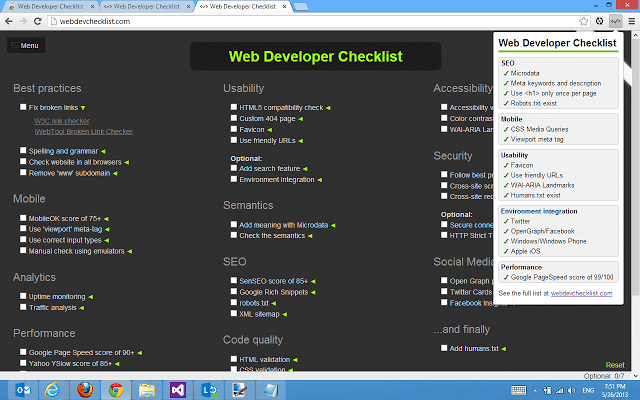
For web developers who wants to make sure they follow best practices. This extension allows you to very easily discover problem areas in your website. Get it!
Type Sample
Type Sample is an extension for identifying and sampling webfonts. Once it’s installed, click the extension and hover over text on a webpage to identify the font being used. Get it!

Eye Dropper
Eye Dropper is open source extension which allows you to pick colors from web pages, color picker and your personal color history. Get it!

Muzli
Muzli brings you the freshest design, UI, UX and interactive news and shots from around the web. Get it!

Google Font Previewer
Lets you choose a font from the Google Font API directory, and apply that font to the entire page or a specified CSS selector to see how it looks. Get it!

PerfectPixel
PerfectPixel allows developers to put a semi-transparent image overlay over the top of the developed HTML and perform per pixel comparison between them. Get it!

SelectorGadget
Selector Gadget is an open source Chrome Extension that makes CSS selector generation and discovery on complicated sites a breeze. Get it!

Live CSS Editor
A neat little browser extension that makes it ridiculously easy to experiment with CSS on a website. Get it!

Validity
Validity can be used to quickly validate your HTML documents from the toolbar. Get it!

Instant Wireframe
This extension allows you to view any web page, local or on the web, with a wireframe overlay. Get it!

Check My Links
When you’re editing a web page that has lots of links, with this extension you are able to quickly check that all the links on the page are working. Get it!

Resolution Test
An extension for developers to test web pages in different screen resolutions, with an option to define your own resolutions. Get it!

Hover Zoom
Browse images galleries with ease: move the mouse cursor over thumbnails to view images in their full size without loading a new page. Get it!